Connecting Networks and Power On Site
Do you find this article helpful? Help us improve by sharing feedback: Give Feedback
Note: These are Advantech gateway instructions. For Dell instructions, see Connecting Networks and Power On Site (Dell).
How to Install
-
Plug a network Ethernet patch cable into PoE IN / LAN B. If using PoE, see Connecting with PoE (Power over Ethernet)
Note: For customer convenience, KMC sells plenum-rated Ethernet patch cables in lengths of 50 feet (HSO-9011) and 75 feet (HSO-9012).
-
To connect a BACnet MS/TP network to KMC Commander, connect it through a BAC-5051E router into one of the Ethernet ports or networks.
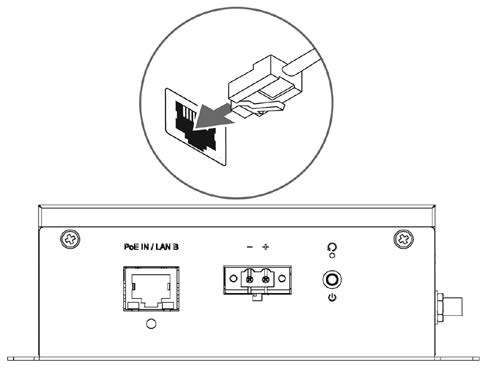
-
If not using PoE, connect a power source. (See Connecting with a DC Power Supply.)
Note: About three minutes after power is connected, the Wi-Fi signal will be fully functional.
Continue to Logging In at the Job Site.
We value your feedback!
Help us improve this article: Click here to take a 3-minute survey. Your input helps us make our articles clearer and more useful.