Grounding the Gateway
Do you find this article helpful? Help us improve by sharing feedback: Give Feedback
Note: These are Advantech gateway instructions. For Dell instructions, see Grounding the Gateway (Dell).
Note: The gateway will function without being grounded, but connecting the chassis to an earth ground may reduce electrical interference.
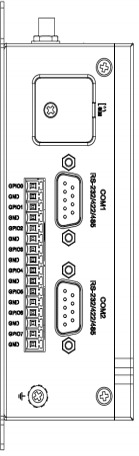
-
Remove the screw with the grounding icon next to it, at the rear bottom corner of the left side of the gateway (when mounted).
-
Connect a grounding cable between the gateway and the secondary enclosure or an earth ground.
-
Tighten the screw.
Continue to Connecting Networks and Power On Site.
We value your feedback!
Help us improve this article: Click here to take a 3-minute survey. Your input helps us make our articles clearer and more useful.